ChatGPT image to SVG converter
Turn your ChatGPT image into SVG paths.
Have a logo, sticker or illustration downloaded from ChatGPT? Upload the PNG, JPG or WebP here, preview the vector paths free and check the details before you export.
Preview your downloaded image Unlimited previews. Sign up for 3 free image exports total. No card required.
Editable paths with colors and transparency.
Free local previews. Sign in to export with your available allowance. Animated images: first frame only.
- Download the original image from your chat, rather than taking a screenshot.
- Upload it here. Compare the source, vector preview and path view.
- Check the lettering and background, then sign up to export your SVG.
Start with the file you actually downloaded.
A PNG, JPG or WebP contains pixels. Tracing reconstructs their visible regions as SVG paths you can resize and edit in a vector editor. If you already have an SVG, inspect its objects first: it may contain usable geometry and need no tracing. Renaming a PNG to .svg or placing it inside an SVG document leaves those pixels as a raster image. Choose the workflow from the file's contents, rather than its name or which assistant made it.
Check whether your SVG contains paths


Keep the original within the 4MP limit.
Use the original download to avoid screenshot borders and another resizing step. Vectali accepts up to 10 MiB, 4,000,000 total pixels and 4,096 pixels on either side. Multiply width by height: 2,000 × 2,000 reaches the area limit; 3,000 × 2,000 exceeds it. When a file is too large, preserve the original and crop unused canvas or resize a separate copy. Recheck small letters after resizing. A smaller compressed file can still contain too many pixels.
Check the current image limits- 2,000 × 2,000
- 4MP · fits the area limit
- 3,000 × 2,000
- 6MP · needs a smaller copy
Inspect the words, gaps and shading.
Compare the smallest lettering at the size you will use, then zoom in on openings and thin strokes. Check that the word says what you intended before tracing: conversion can follow a malformed letter but cannot know the correct spelling. Traced lettering becomes outlines; it does not recover the original font or let you type a different phrase. Soft shadows, highlights and textured shading can become extra shapes or visible color bands. If a detail is already missing from the input, use a clearer source or redraw that part. A smooth outline alone does not establish an accurate result.
Follow the trace inspection checklistLettering: compare the openings, not just the outline.
Shading: inspect the hat and face at a larger size.
Check the sticker edge on light and dark.
A transparent file can still have an intentional white sticker border, a painted backdrop or pale edge pixels. Test both light and dark backgrounds before deciding what to remove. Conversion does not automatically remove a white box or distinguish it from white artwork. Keep the untouched conversion beside any cleanup you make in your vector editor.
Diagnose backgrounds and pale edgesChoose browser conversion or convert inside ChatGPT.
This page previews locally in your browser with Vectali's Rust engine and needs no account for a preview. Sign in when you want to export. Keep an unexported preview tab open; reloading can lose its local result. In the dashboard, enabling history saving uploads the original and SVG after an authorized export. You can also connect Vectali inside ChatGPT for server conversion using your API allowance. Browser exports and API credits are separate, so Web Pro or a browser credit pack does not fund in-chat conversions.
Set up Vectali inside ChatGPT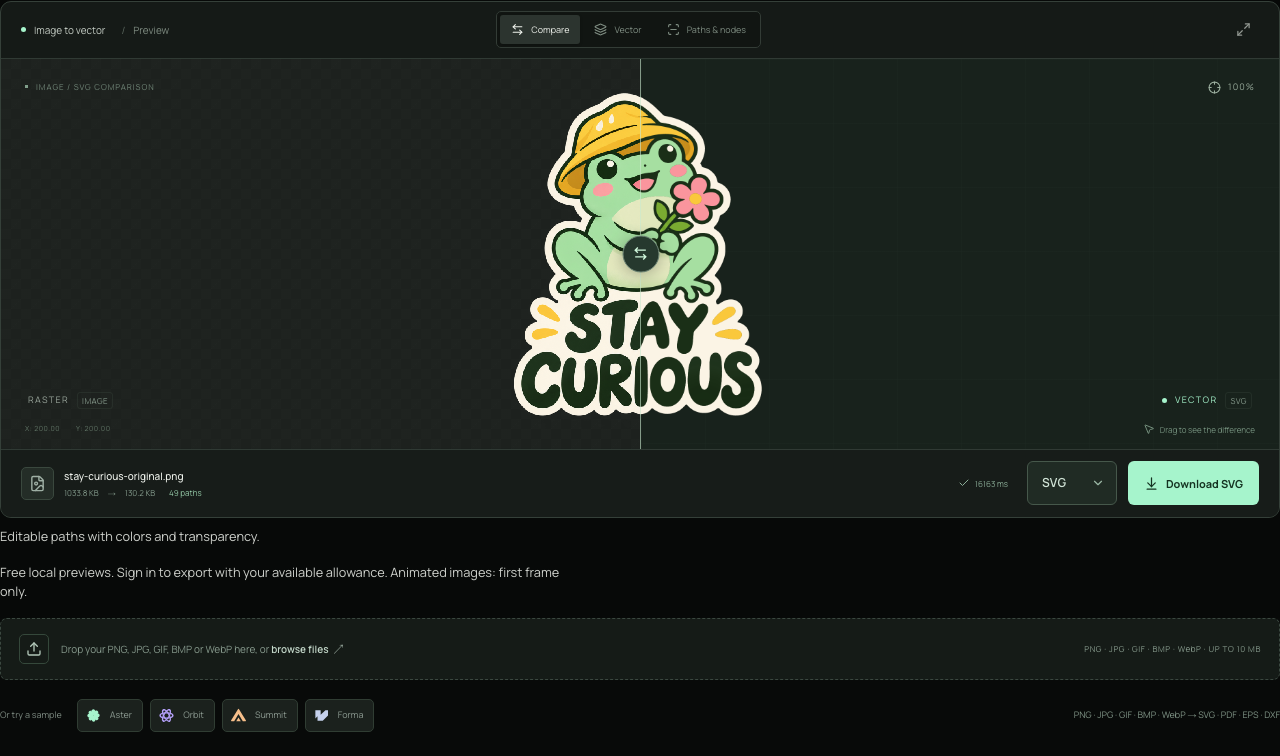
- CompareDrag the divider to reveal the original and the trace.
- Paths & nodesInspect the traced contours; return to Vector to check the colors.
- Download SVGChoose SVG, then sign in when prompted to authorize an export.
Before you export.
Is ChatGPT image to SVG conversion free?
Browser previews are unlimited and need no account. A free Vectali account includes 3 lifetime image exports total, with no card required. For more browser exports, buy a web credit pack or choose Web Pro. The ChatGPT plugin uses separate API credits; connecting it does not add an allowance.
Will a traced image be ready for printing or cutting?
Check the actual SVG in your intended application. Inspect closed gaps, background objects, outlines and physical size before production. A scalable vector is not automatically a clean cutting file, and complex shading may need manual simplification. Ask the recipient for its format and setup requirements.
Should I keep the original PNG or WebP?
Yes. Keep it beside the SVG so you can compare any altered detail. A raster may still be the better delivery file for photographic texture or a service that requires fixed pixel dimensions. Use the vector when you need editable shapes and the reviewed trace suits the job.